This is a minor update that clarifies how to use the text file loading options.
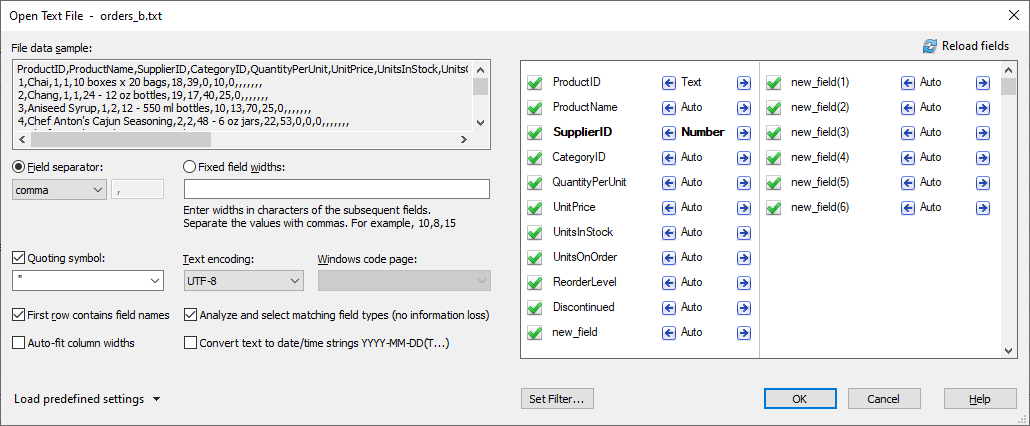
The “Convert text to numbers” check box label has been changed to a more adequate one:
“Analyze and select matching field types (no information loss)”
Un-checking this option means that every field on the field preview list with the “auto” label will be treated as a short text (up to 8K) field. The data will look in GS-Base exactly how they are saved in that text file.
If you change “auto” to “number/text/LongText” for a given field, this specific custom field type will apply instead (forcing the data conversion which converts e.g. text to numbers and can result in skipping non-numeric text strings in a mostly numeric data column).Parsing numbers and date-time strings usually results in noticeable slower text file opening.
Field types can be also freely converted after the file is opened.
If the option is checked, GS-Base will perform two passes through the entire text file. During the 1st one GS-Base will determine which columns represent numbers and which contain any data that can’t be fully/properly converted to numbers without some information loss and must become Text (8K) or LongText (up to 4GB) fields in GS-Base.
GS-Base 22.4.1 (2025-11-05)
The update addresses some xlsx compatibility problems that might occur for some Excel versions other than the online Excel 365.
GS-Base 22.4 (2025-08-27)
- Created search keys now also include defined sorting orders. (Which means a “search key” can effectively be also a pure “sort key”.)
- Corrected repainting of the “Search Keys” and “Tables” drop down combo box. (In the “dropped” state they initially have black background till you move the selection.)