Changes and new features:
(1) Loading and saving OpenDocument *.ods files should typically be 2.5 to 3 times faster. In some cases — such as a column of millions of floating-point numbers — this difference can reach 7-8 times.
Before saving an *.ods file, GS-Calc no longer displays the dialog box asking you to specify the *.ods version (Google Sheets or Excel). This selection has been moved to the “Settings” dialog box. The version of an existing, already loaded *.ods file is preserved when it’s saved.
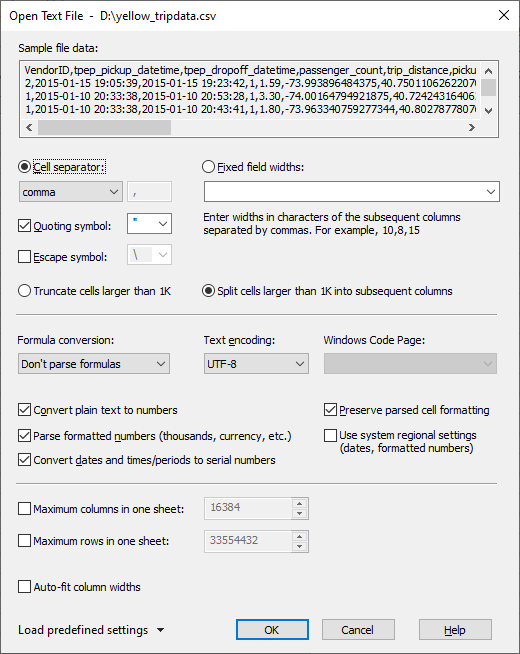
(2) Loading text *.csv and *.txt files with mixed contents (text, numbers, dates) and the number/date parsing option “on” and the “Auto-fit column widths” option “on” should typically be around 6 times faster. Saving should be around 3 times faster. In edge cases where most of the content consists of floating-point numbers or dates, this difference can be noticeably bigger. However, if all parsing - converting text to numbers and dates options and the “auto-fit column widths” option are “off”, loading times are similar.
(3) The standard ISO date/time styles (“YYYY-MM-DD” and “YYYY-MM-DD HH:MM:SS”), previously missing, have been added to the list of parsed and formatted date/time styles. This guarantees that when existing text files containing such date formats are saved, the dates will be saved using the same style (not just a closely matching one).
(4) The “Open Text File” dialog box now also enables you to choose which number and date locales should be used to parse numbers and dates.
(5) The “Save Text File” dialog box now enables you to specify whether the saved UTF-8 text file should contain the 3-byte BOM (Byte Order Mark) header. This is required by Excel to correctly read international characters, but can be problematic for most other applications, which by default assume UTF-8 encoding.
(6) Saving Excel XLSX files should typically be 3-4 times faster. Loading XLSX files: around 50%-100% faster. As above, in edge cases where most of the content consists of floating-point numbers or dates, this difference should be noticeably bigger.
(7) Saving files in the fast native binary *.gsc format is around 2.5 times faster. (Loading times are similar.)
(8) Updating sheets is faster by several percent up to around 30%, depending on how complex/long the formulas are, how many floating-point numeric parameters they use, and which CPU is used.
(9) The default column width can be modified in the “Settings” dialog box. Once saved, workbooks and sheets apply this default value automatically, ensuring a consistent visual appearance across different installations of GS-Calc, regardless of their local default column width configurations.
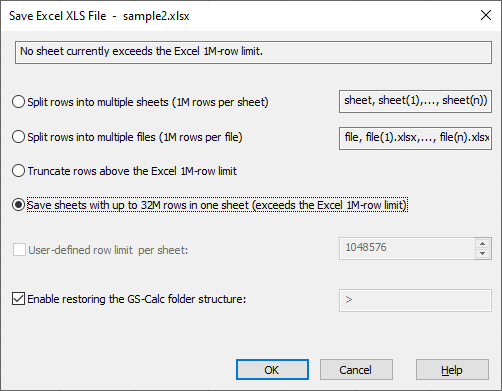
(10) Both Excel *.xlsx and OpenDocument *.ods sheets saved by GS-Calc can now have more than 1M rows (up to GS-Calc’s 32M row limit).
(11) When saving Excel *.xlsx and OpenDocument *.ods files, GS-Calc no longer displays the dialog box asking you to switch from the standard zip format (ZIP32) form the ZIP64 zip variant, that is used by default for the native GS-Calc files. It’s performed automatically.
(12) For clarity, the “Text - single sheet (*.txt, *.csv, .tab…)” and “Text archive - all sheets (*.zip)” file types have been separated in the standard “Open File” dialog box.
The latter is useful not only for saving or loading the entire workbook as text all at once, but also for bypassing the “Open Text File” dialog box. Inside the ZIP archive, GS-Calc automatically saves an XML file with your text parameters as soon as you specify them for the first time.